The letter lives
in your product.
Drop a 600px email editor into a collections workspace, a billing app, or an ESP. You keep accounts, subject, and send. Operators design the letter. Compile returns HTML that inbox clients can paint.
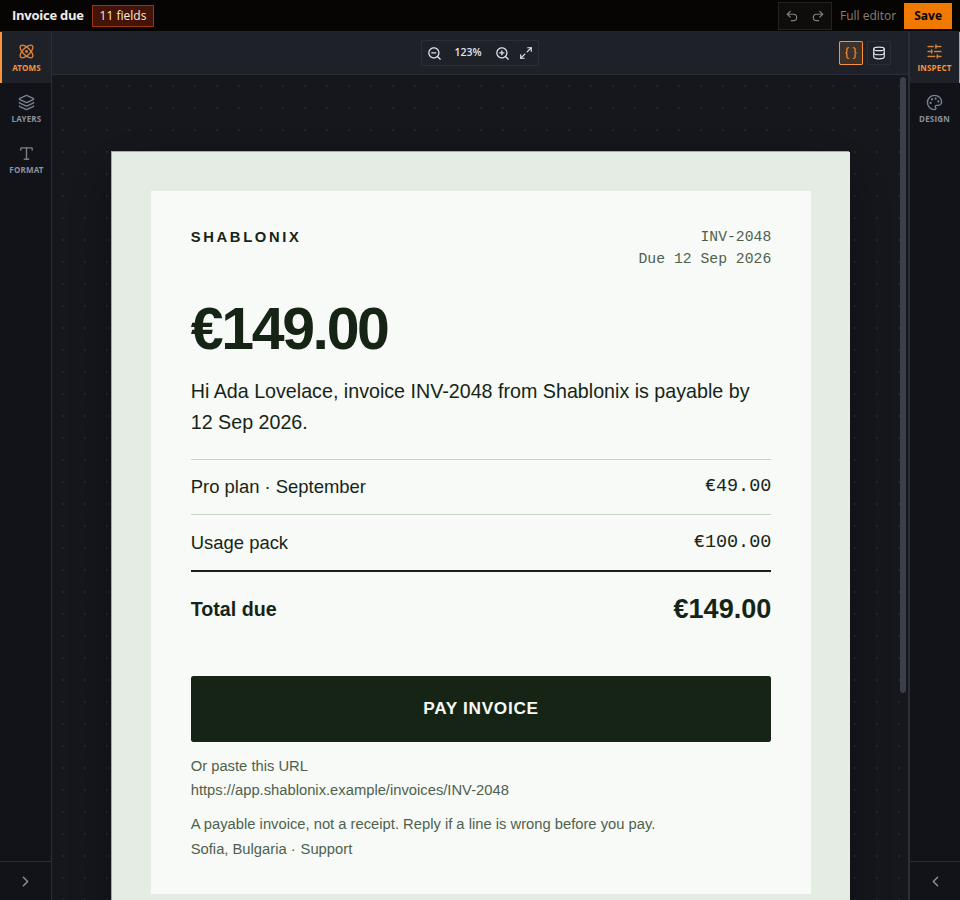
- Plugin bar Letter name, how many host fields are bound, undo, Full editor, and Save. The host can keep its own Save outside the frame.
- Insert Atoms, Layers, and Format sit as 52px icon strips. Click to add text, tables, links, and helpers without opening the full studio.
- The letter A 600px canvas. Bindings resolve against host JSON. Compile turns this into table HTML that inbox clients can actually paint.
- Style Inspect and Design. Select a line in the letter to change type, color, and spacing. Website route chrome stays out of the plugin.
Your chrome. Our hole.
Keep Library, subject, preview, and Send where your operators already look. Replace only the design canvas with the iframe. File menus, version history, and the template library stay in Full editor — a new tab on editor.shablonix.online.
You keep
- Accounts and records Tenants, invoices, cases — those stay in your product.
- Subject and send You own the mailbox, the ESP, and when the letter goes out.
- Business JSON invoice.*, customer.*, case.* — the same object you already store.
Shablonix provides
- The letter editor An iframe plugin. Your CSS does not leak in. Ours does not leak out.
- Handlebars bindings Operators bind fields on the canvas. You pass matching JSON.
- Inbox HTML POST /v1/emails/compile returns HTML and text. Compiled mail is not stored.
Three calls. Then you send.
The secret API key stays on your server. The browser only ever sees a one-time session URL and the letter.
- 1 · Mint a session POST /v1/embed/sessions
Your backend calls Shablonix with a secret API key and the page origin. The key never sits in frontend JavaScript. You get a one-time iframe URL locked to that origin.
- 2 · Mount the plugin embed.js · ShablonixEmail.mount
Drop the iframe where the design canvas would be. Keep subject, proof, and send in your chrome. load({ sampleData }) fills the letter from your JSON; missing fields show on the binding chip.
- 3 · Compile and send POST /v1/emails/compile
On send, post live JSON in the same shape. You get HTML, text, and provider payloads. You deliver. We do not keep the compiled message.
<script src="https://editor.shablonix.online/embed.js"></script>

ShablonixEmail.mount('#letter', {
  src,
  theme: 'dark',
  onReady() { plugin.load({ sampleData }) },
  onSave(payload) { /* html, json, templateId */ }
})
Email compiles are metered per plan, separate from PDF generation. Integration notes live in the API reference under embed sessions and /v1/emails/compile.
Put a hole in the workspace. Keep send.
Start a trial, mint a session from your backend, and drop the iframe on one canvas. PDF templates stay on the main editor — this plugin is for letters.